domingo, 2 de junio de 2019

Views of pieces

You can practice drawing views in this web page:
www.educacionplastica.net/3dcube_model/vistas_3d_2x2.htmlwww.educacionplastica.net/3dcube_model/vistas_3d_2x2.html
I think it is a very educative method also funny :)!!!
This method also allows you to rotate the piece to better observe the views.
There are two systems
1. European:


2. American System:


We have done several exercises, representing the:

  • Front view
  • Left side view.
  • Botton view.


martes, 12 de marzo de 2019

Control of a servomotor with a potentiometer (variable resistor by turning it).

Good morning,

Today we show you how to control a servo motor from left to right by turning a potentiometer (variable resistance), left or right.

The signal from the potentiometer reaches the Arduino via input A0 (input pin A0).

The Arduino is programmed to rotate the servo by sending the signal through the output (output 0).

Here we have the base to control a turn of a steering wheel... For example of a lunar vehicle!

click here


lunes, 4 de febrero de 2019

Programming a traffic-light with Arduino

Good morning,

Today I show you a traffic light project programmed using Arduino.

Materials

3 LEDS
220 Ohms Resistor
Wires
Arduino
Breadboard

First the green LED will light up, then the yellow LED and finally the red LED, the process will be repeated indefinitely.

viernes, 1 de febrero de 2019

Two circuits with multimeters to observe the electrical parameters

Electrical definitions:
  • ELECTRICITY: The flow of electrons from negative to positive pole in a conductor.
  • VOLTAGE: That force which is generated to cause current to flow in an electrical circuit. Voltage is measured in Volts "V".
  • INTENSITY OF THE CURRENT: Flow of electricity along a surface of conductor in a time. Current is measured in Amperes "A" = Coulombs/sg. 1 Coulomb= 6.242×10¹⁸electrons.
  • MUL TIMETER: A testing device that can be set to read ohms (resistance), voltage (force), or amperes (current) of a circuit.
In the following circuits, we can see how the electrical parameters vary, when only the voltage or force of the battery changes. The circuit with the lower voltage battery will look less and have less intensity.

Hello my followers.

Today I'm going to present our first simulated circuit with tinkercad.

It consists of:
  • Battery
  • Wires
  • Bulb
  • Pushbutton switch
Operation: The electrons leave the negative pole attracted by the positive pole, in the filament of the bulb they collide producing heat by friction, then the filament becomes bright red, giving light.
https://www.tinkercad.com/things/7uEIIphxe5T-maria-rodriguez-perez/editel


First microcontroller program - Blinker

Good morning.
Today we present the first program for the Arduino microcontroller.
For this practice we need:
  1. LED diode
  2. Cables
  3. A resistance of 220 Ohms. (Not to burn the LED)
  4. An Arduino microcontroller.
Steps:
  1. We connect the positive of the LED to the 0 port of the Arduino.
  2. Connect the negative of the LED to the resistor.
  3. Finally the resistance to the GND port of the Arduino.
  4. We program by blocks so that the positive in the zero port opens 1 second, then closes 1 second, the program will be repeated infinitely, so the LED will be flashing.

viernes, 21 de diciembre de 2018

Programming Lightbot

Today we have done an exercise of educational programming, it was about controlling the nice lightbot: http://lightbot.com/flash.html

My personal opinion: This is a educational program wich you not only learn programming, but  also is very fun. At the beginning it was easy but when you avanced, it was getting more difficult. When you have been doingh it a while, you start to stress you because you can´t make it. 


sábado, 24 de noviembre de 2018

You can practice drawing views in this web page:
www.educacionplastica.net/3dcube_model/vistas_3d_2x2.html
I think it is a very educative method also funny :)!!!
This method also allows you to rotate the piece to better observe the views.
There are two systems
1. European:
2. American System:

We have done several exercises, representing the:

  • Front view
  • Left side view.
  • Botton view


viernes, 23 de noviembre de 2018

Good morning, 

Today we present to you a method to make written reports with a nice format that includes tables and graphs.

Step 1: Open google spreadsheet and make a table.

Step 2: Select the table and press the chart button to generate the bar chart.

Step 3: Open a Google document, write a title and a text and then copy and paste the table and graph into a Google document.

One of the great advantages is that if we link the tables, each time we make a change in the spreadsheet, we will be asked if we want to update the change in the report.

The spreadsheet will look like this:Click here to download the sheet


The report document will remain:Click here to download the document


sábado, 17 de noviembre de 2018

Risks of the Internet and new technologies


On one hand,I think that the new technologies can be very useful  because we use the internet for many things such as work or to do homework.
On the other hand it can also be very dangerous if you do not use them in the correct way.

You can have fun with it but is necessary to be very careful with the things you do. If you send an information to someone, you suppose that it is not going to be taught(showed) to anybody, but you can not be sure. You have to be careful on what you have in your electronic devices though you do not want to share it with anybody.

I personally think that you should have fun but being conscious on what you do.


viernes, 26 de octubre de 2018

Good morning,
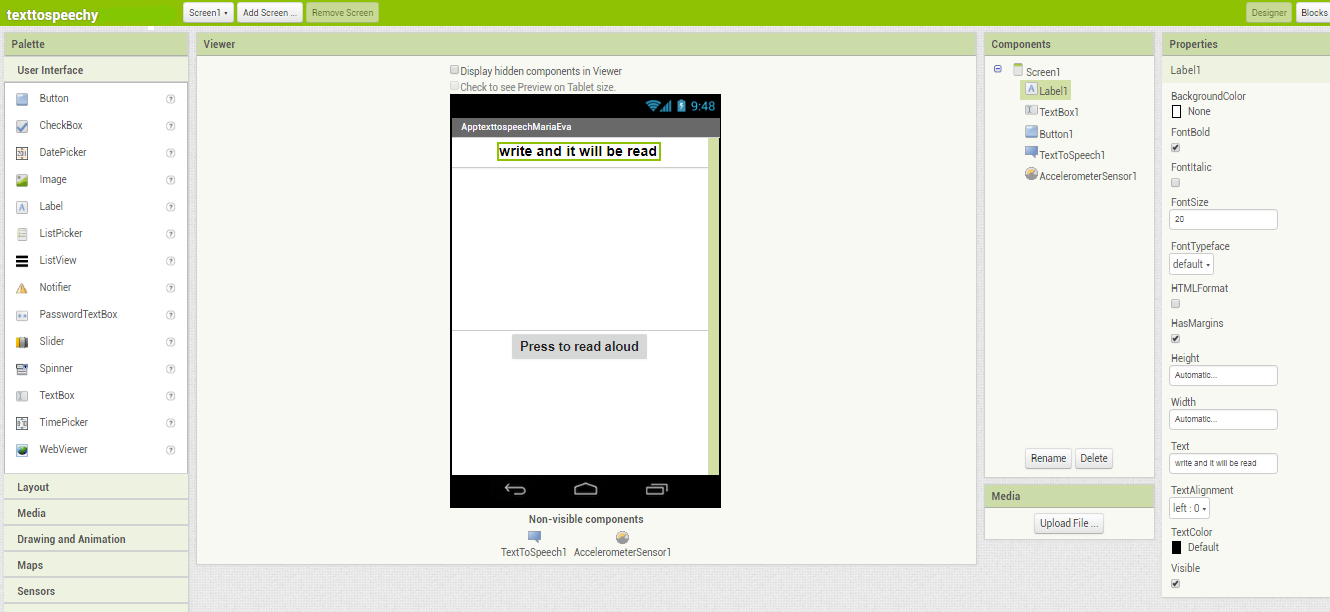
Today I present to you the development of an app that allows us to write or paste a text in a text box and reproduce it aloud.
We have used a online program App inventor to depevelop our app
For the design we use:
  • A label.
  • A text box.
  • A button.
As mobile resources contained these:
  • The TexToSpeech engine
  • Accelerometer sensor.
The design screen will be:


 The programming blocks will be:

Apps animals and sounds

Good morning, Today we present you a design of an app. It has buttons with photos of animals and vehicles. When you press the photos the sou...